Where the manual work enters
Shared drives become difficult to use when incoming documents rely on people to inspect, name, and file them consistently. Misfiled records also make later retrieval slower and less reliable.
Demonstration build
A Google Drive workflow that detects a new file, reads its contents, classifies the document, finds the matching destination, and moves the file into the appropriate folder.
Document operations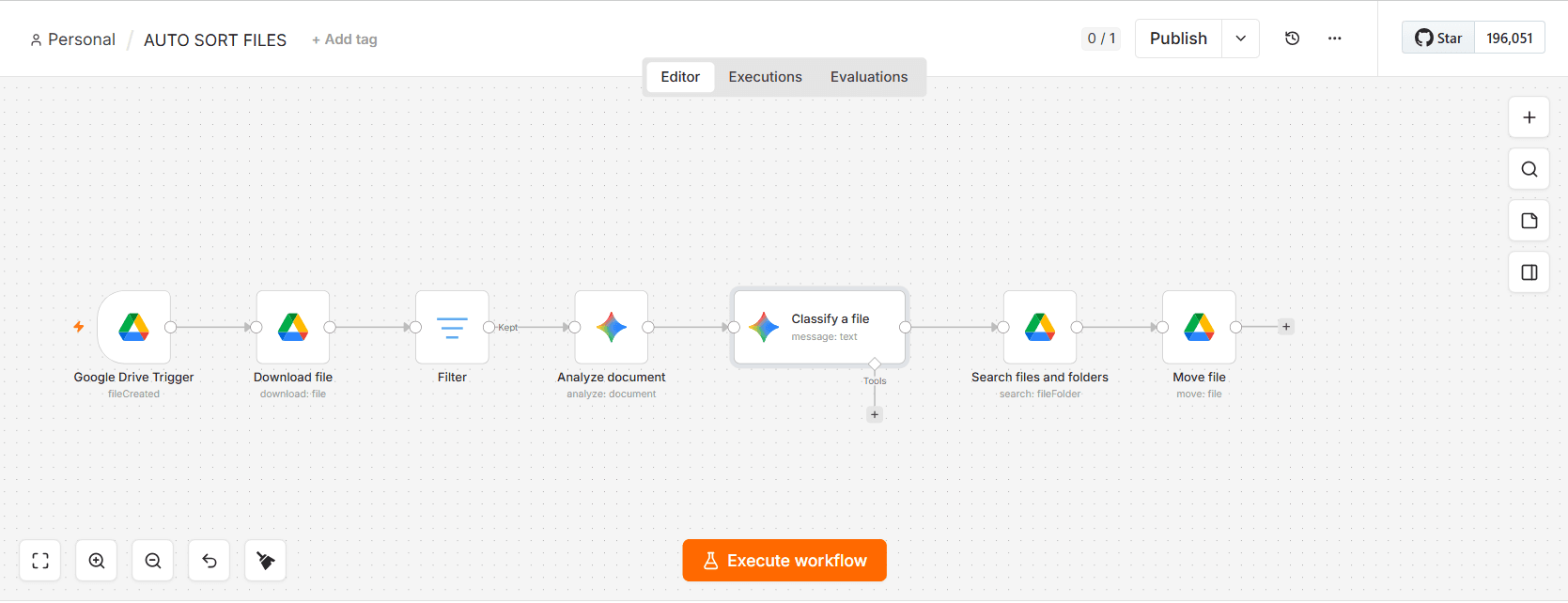
Shared drives become difficult to use when incoming documents rely on people to inspect, name, and file them consistently. Misfiled records also make later retrieval slower and less reliable.
A Google Drive trigger starts the workflow when a file is created. The file is downloaded and filtered, its document content is analysed, Gemini classifies it, and Drive search resolves the destination folder before the move step runs.
Each accepted file reaches a classification decision and a corresponding Drive folder-move step without requiring a person to inspect and sort it first.
Signal path
Watch Google Drive for a newly created file.
Download, filter, and analyse the document contents.
Use Gemini to determine the appropriate file category.
Find the matching folder and move the document into place.
Tools in the system
Demonstrated capabilities
This project is a portfolio demonstration. It is not presented as a client deployment and makes no claim about production use, revenue, time saved, or business performance.
Next system
Messenger commerce agent →Discuss a process like this ↗